
Focus on Important Areas
Define zones around entrances, gates, driveways, parking areas, and other important locations.


NABIK SMART SURVEILLANCE
Focus monitoring on gates, entrances, parking areas, and other important locations using configurable AI detection zones and alert rules.
MORE RELEVANT MONITORING
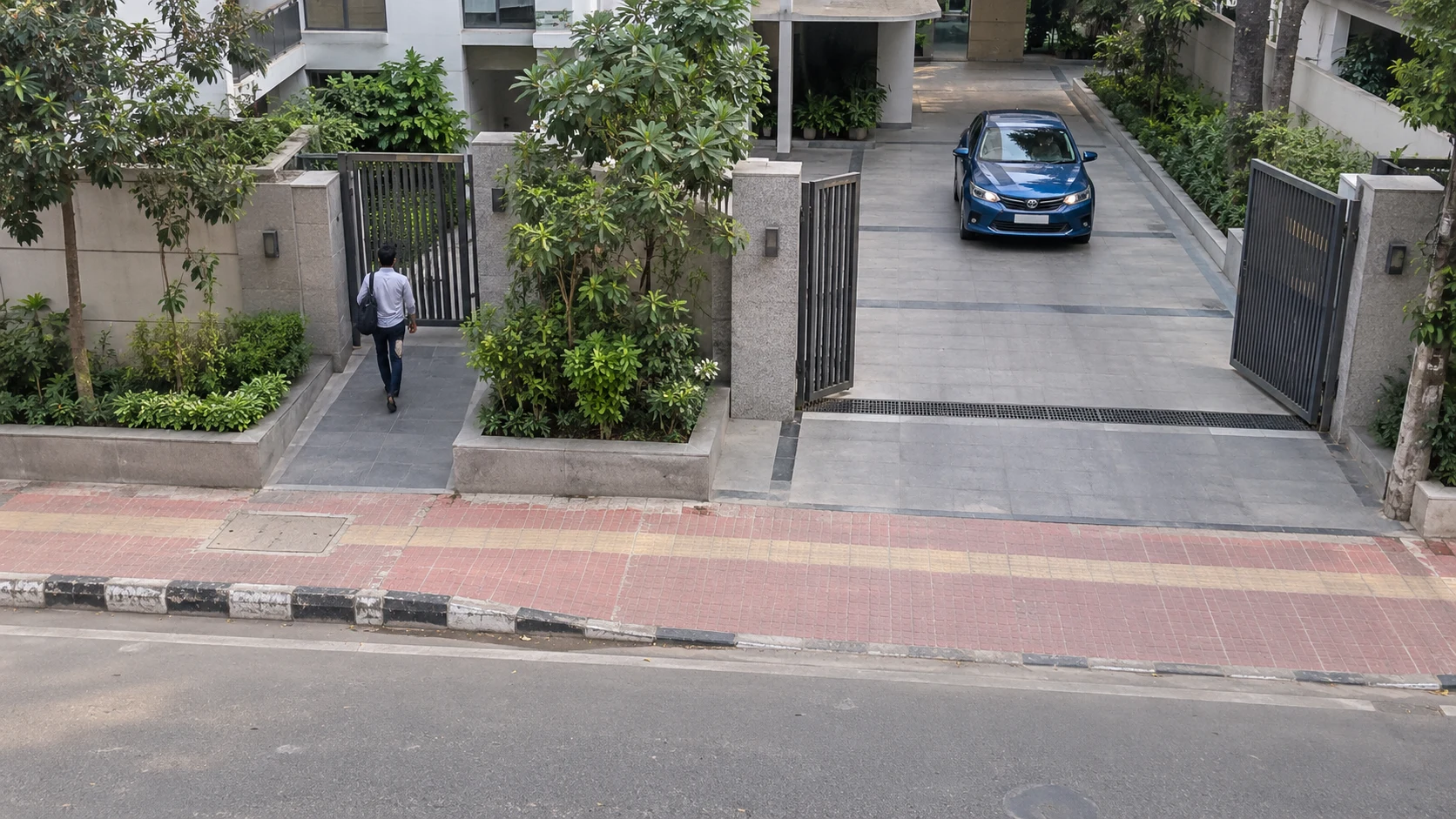
A camera may see a busy road, moving trees, passing pedestrians, and your property's entrance at the same time. You probably care most about the entrance. Nabik helps focus AI event monitoring on selected areas, making alerts and recordings easier to review.
Define zones around entrances, gates, driveways, parking areas, and other important locations.
Choose supported object types, such as people or vehicles, for different monitoring areas.
Use zone requirements and detection filters to reduce alerts from activity outside your areas of interest.
Review activity associated with configured zones instead of treating every detected object equally.
SEE HOW SMART ZONES WORK
Define multiple zones within compatible camera views. Configure which supported objects and areas matter most to your property.
Main Entrance · PersonParking · CarSidewalk · Outside priority alertPerson detected inside the Main Entrance zone. In this example, entrance activity meets the configured priority-alert rule.
This demonstration illustrates a configured scenario. Zone alerts do not identify unauthorized visitors or determine suspicious behavior. Boundaries and alert rules must be configured correctly.
FROM CAMERA VIEW TO RELEVANT ALERT
Compatible IP cameras provide video streams to the Nabik AI Box.
Select important areas such as a main gate, driveway, or parking entrance.
Choose supported object types and zone conditions for important events.
Review matching events and receive notifications through supported, configured channels.
Zone-based alerts require object detection and the appropriate review and notification settings. Delivery is not guaranteed during network or service interruptions.
A MORE FOCUSED APPROACH
AI object detection and zone-based rules can help focus alerts on selected objects and locations.
Some modern AI-enabled cameras and NVRs provide comparable smart-zone features. Nabik adds flexible AI monitoring to compatible existing camera streams through dedicated hardware.
FLEXIBLE MONITORING OPTIONS
Tailor event monitoring to your property, camera placement, and supported detection settings.
Define separate areas in one camera view. An apartment camera can cover both a pedestrian entrance and a vehicle gate.
Monitor supported people near an entrance and cars near a driveway, with rules suited to each area.
Require a configured minimum presence time in a zone. Brief passage and longer presence can be treated differently; tracking time does not establish intent or authorization.
Prioritize selected zones and labels while other tracked activity remains available for review according to configuration.
Tune the boundary to the field of view. Focus on a property's gate rather than the adjacent public road.
Send a Telegram notification or trigger a supported automation when a configured event qualifies. Integrations require setup and connectivity.
PRACTICAL MONITORING FOR EVERY PROPERTY
Focus monitoring on the places that matter to your property and operations.
Main gates, parking entrances, building lobbies, shared access areas.
ILLUSTRATIVE EXAMPLEA person enters the main-gate zone.
Front doors, driveways, garden entrances, boundary gates.
ILLUSTRATIVE EXAMPLEA person enters the front-door zone.
Customer entrances, storage access, shopfronts, selected interior areas.
ILLUSTRATIVE EXAMPLEPerson detected in a rear-access zone.
Reception entrances, corridors, staff entry points, selected shared areas.
ILLUSTRATIVE EXAMPLEPerson activity near a configured access point.
Loading bays, vehicle gates, storage entrances, operational access.
ILLUSTRATIVE EXAMPLETruck in the loading zone, if the model supports it.
Vehicle entrances, access lanes, garage gates, selected parking sections.
ILLUSTRATIVE EXAMPLEA car enters the parking-entrance zone.
Authorized shared entrances, vehicle gates, parking and common access points.
ILLUSTRATIVE EXAMPLEVehicle detected at the campus entrance.
Public entrances, vehicle access, parking, appropriate common areas.
ILLUSTRATIVE EXAMPLEVehicle enters a parking-access zone.
Main Entrance · PersonParking · CarSidewalk · Outside priority alertKEEP YOUR CAMERAS. IMPROVE YOUR MONITORING.
With compatible cameras and a properly configured Nabik AI Box, existing streams can support more focused AI-based monitoring.
Use supported cameras already installed without unnecessary replacement.
Create zones based on how your property is actually used.
Configure selected categories according to the area being monitored.
Focus review on important zones and configured alert criteria.
Adjust zones and add cameras within supported hardware capacity.
STAY INFORMED WHEN IT MATTERS
Connect configured detection events with supported notification and automation integrations.
Receive configured event notifications when the integration is enabled and connected.
Use supported detection information in automations where the integration is configured.
Review important alerts and other detections through the configured surveillance interface.
Notification setup and connectivity are required. This is a concept, not a Nabik mobile app.
PLAN YOUR MONITORING
Cameras must provide supported video streams and suitable image quality.
Zones, object labels, alert criteria, and notification integrations must be configured.
Placement, lighting, image quality, and environmental conditions affect results; detections may be missed or incorrect.
Automated alerts do not guarantee detection, notification delivery, or emergency assistance.
YOUR QUESTIONS, ANSWERED
Everything you need to know about Smart Zone Alerts.
Smart Zone Alerts use configured areas within a camera view, together with supported object detection, to help identify activity that matters in particular locations, such as entrances, gates, and parking areas.
Yes. With the appropriate object tracking and required-zone settings, events can be prioritized when a person enters a configured zone. Notification delivery requires a supported, correctly configured notification method.
Properly configured zones and object filters can reduce irrelevant alerts by focusing on specific locations and supported object types. However, false alerts cannot be eliminated completely.
It may work with compatible existing IP cameras that provide suitable network video streams. Camera compatibility and system capacity should be checked before purchase.
Supported local object detection and zone processing can work over the local network without continuous internet access. Internet-dependent notifications and remote services require connectivity.
Yes. A compatible camera can have multiple configured monitoring zones, subject to suitable coverage and the system's technical configuration.
Yes. Supported object categories can be assigned to appropriate monitoring zones, such as people at a pedestrian entrance and cars at a vehicle gate.
Supported configurations can use a minimum time requirement for tracked objects within selected zones. This measures presence within a configured area and does not determine intent or whether a person is authorized.
Yes, configured qualifying events can be integrated with Telegram notifications where the supported notification setup has been enabled and tested.
No. Smart Zone Alerts help identify and organize relevant camera activity, but they do not replace appropriate human supervision, physical security measures, or emergency response arrangements.
SMARTER MONITORING STARTS HERE
Discover how Nabik can add configurable AI monitoring zones and smarter event alerts to your existing compatible CCTV cameras.